> For the complete documentation index, see [llms.txt](https://help.highlight.net/llms.txt). Markdown versions of documentation pages are available by appending `.md` to page URLs; this page is available as [Markdown](https://help.highlight.net/functionality/class-autodiscovery.md).
# Class Autodiscovery
## Overview
Highlight can discover classes on monitored bearers from the following manufacturers: Cisco, Juniper and Huawei. Each discovered class will have its own watch status card and details page.
This page explains the implementation considerations for Highlight to discover and report on Classes of Service in networks, typically those running MPLS.
## 1. Class-Based Traffic Management Explained
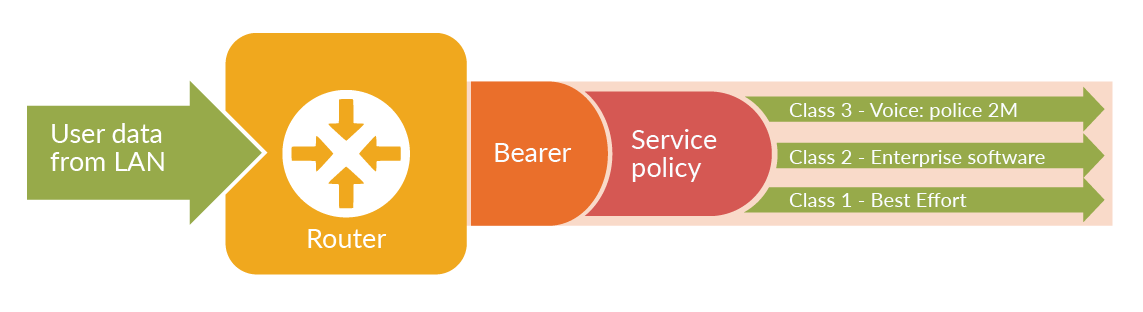
Whilst most Service Providers (SPs) who offer Class of Service on their networks do so by running an MPLS backbone, true MPLS functionality is normally confined to the core network. As far as the customer is concerned, they simply wish to prioritise different types of traffic so that different classes (Voice, Mail etc.) receive different treatment as they transit the network.
Customer data therefore needs to pass through some kind of translation layer as it enters the network, where generic customer-specified rules for categorising data — for example "Voice has priority, SAP is less but must always have precedence over Browsing" — are translated into markers that the network itself can understand. This layer allows SPs to run a common set of rules and classes in the network core, but still allow their customers to choose how their own traffic is split into those classes.
For simplicity, this translation is usually done at the edge of the network, on the customer's edge device (CPE). In Cisco's case, this normally uses the Class-Based Quality of Service (CBQOS) feature. CBQOS lets customers specify rules (a service policy) for matching types of traffic, and applies those rules to a given interface on the router so that these types of traffic are marked by the CPE in ways that the core can recognise — typically by setting the DiffServ (Differentiated Services or DSCP) field in each packet to an agreed value. The core will be architected to look for these markers and route traffic accordingly, probably (but not necessarily) using MPLS.
Highlight takes advantage of this marking in two ways. First, it uses SNMP to extract CBQOS information from the CPE router, and thus monitors traffic levels for each class of traffic passing through an interface, as well as overall traffic on the interface itself. Second, it can use Cisco ipSLA software, normally present as standard on the CPE, to inject test packets into the network marked with these same fields, and thus measure how efficiently the network is processing different classes. For example, if Highlight is tracking a class used to carry SAP traffic, it can send tests into the network marked with the same class information so that those test results reflect much more accurately the way those SAP packets are being handled.
## 2. Router / CPE Configuration
For details and an example of how to set up the monitored device, refer to the [Class of Service configuration page](/device-setup/class-of-service-configuration.md). The example configures three outbound classes called `premium`, `classic` and `standard`, and three equivalent inbound classes called `isDscpEF`, `isDscp26` and `isDscp10`.
## 3. Capturing Class Information
### 3.1 Define Classes of Interest
For Highlight to collect and report on classes, it must be configured with a Core Class Definition (CCD) — a list of class names which are in use on the SP's network. To change the CCD, refer to the [Edit Folder - CCD](/admin/admin-page/folder.md#edit-folder-ccd) section (for users with the required permissions).
In this way, only the classes that are wanted for reporting are shown. Reports are not clogged with Test, Background or Management classes unless these are specifically included in the definitions file.
### 3.2 Learn Classes Defined on a Device
Highlight Class monitoring is based around Interface monitoring, which is Highlight's classic mode of observing a DSL or Dedicated bearer circuit and showing detail on its traffic and health levels. When Highlight starts monitoring a device it reads all the classes defined, ready for Auto-discovery to be set on the watch.
Highlight checks for new classes bound to an interface every 30 minutes, so additions to the network configuration will automatically be picked up and reported on.
{% hint style="info" %}
Classes deleted from an interface will not be removed from monitoring — the Service Provider will almost certainly not want to lose historical data. Deleted classes must be manually removed from Highlight.
{% endhint %}
### 3.3 Change of Class Names
If class names are added to the network, or class names are changed, the Service Provider should notify Highlight Support so that the CCD can be updated. New class names can be merged with old, or treated as aliases which feed into the same reports while the changeover is effected.
## 4. Configuration for Class Autodiscovery in Highlight
Refer to the [Autodiscovery section on the Edit Watch Admin page](https://help.highlight.net/admin/admin-page#features-tab) for details of how to configure autodiscovery of classes. It will take about 15 minutes for Highlight to discover and display classes.
Highlight will search for class definitions tied to the monitored interface taken from the initial validation, and compare this with the CCD list, then start showing detail on any which appear in both lists.
## 5. Testing Quality of Service
Highlight uses Cisco's ipSLA technology — Service Assurance Agent (SAA) — to test the quality of network paths, and refers to this activity as Highlight Performance Analysis. SAA can automatically take regular measurements of differing types and store the results. Highlight can program the ipSLA device to take these measurements, then collect the results and display them graphically alongside other reports to form a more complete picture of network behaviour.
ipSLA can send test packets from the CPE node to any other destination — typically a data centre, core site or major public node. These tests include ICMP Pings, TCP Connects to a given port, and UDP Echo requests.
The steps to implementing Highlight Performance Analysis on top of Class monitoring are as follows:
### 5.1 Ensure SNMP Access is in Place
Although Highlight will already have Read-Only access to the CPE device, it requires Read-Write access to that part of the SNMP MIB controlling ipSLA testing. Refer to the [SNMP commands needed to achieve Read-Write SNMP access](https://help.highlight.net/device-setup/snmp-config#cisco-performance-snmp-access).
### 5.2 Configure the Performance Test
Follow the procedures to [add a performance test](https://help.highlight.net/admin/admin-page#create-performance-test).
## 6. Summary
Configuration of MPLS / Class of Service and testing on Highlight is simplified if the requirements are understood in advance and a plan is set in place for implementing them. For example, if standard templates are used for building CPE router configurations, then lines to enable Highlight monitoring can be added to them before deployment begins, which creates a standard environment that both sides understand.
To facilitate this, we strongly recommend that a planning meeting be held using this document as technical input, so that both sides understand all aspects of the proposed implementation. Each should allocate both a business and technical project contact so that effective communication can be established and maintained.
---
# Agent Instructions
This documentation is published with GitBook. GitBook is the documentation platform designed so that both humans and AI agents can read, navigate, and reason over technical content effectively. Learn more at gitbook.com.
## Querying This Documentation
If you need additional information that is not directly available in this page, you can query the documentation dynamically by asking a question.
Perform an HTTP GET request on the current page URL with the `ask` query parameter, and the optional `goal` query parameter:
```
GET https://help.highlight.net/functionality/class-autodiscovery.md?ask=&goal=
```
`ask` is the immediate question: it should be specific, self-contained, and written in natural language.
`goal` is optional and describes the broader end goal you are ultimately trying to accomplish on behalf of the user. GitBook uses it to tailor the answer towards what is most useful for that goal.
The response will contain a direct answer to the question and relevant excerpts and sources from the documentation.
Use this mechanism when the answer is not explicitly present in the current page, you need clarification or additional context, or you want to retrieve related documentation sections.